ERP for sheet metal fabrication in India
We used Crator to build a working sheet metal ERP reference around a 40-enclosure order. It follows the approved drawing, sheet allocation, manufacture, inspection, delivery and invoice, then proves that a superseded drawing can stop a second job. The screens below come from the live ERP, not a design mockup.
Why sheet metal fabrication software has to control the drawing and the sheet
A fabrication order is defined by more than an item code and quantity. The released drawing, material specification, sheet allocation and inspection result have to remain connected while standard ERP documents carry stock, delivery and accounts.
The drawing revision decides what can be made
A job released against revision A cannot quietly continue after revision B becomes current. The production record has to preserve the released revision and block a new release when that revision is superseded.
Sheet stock has an area outcome
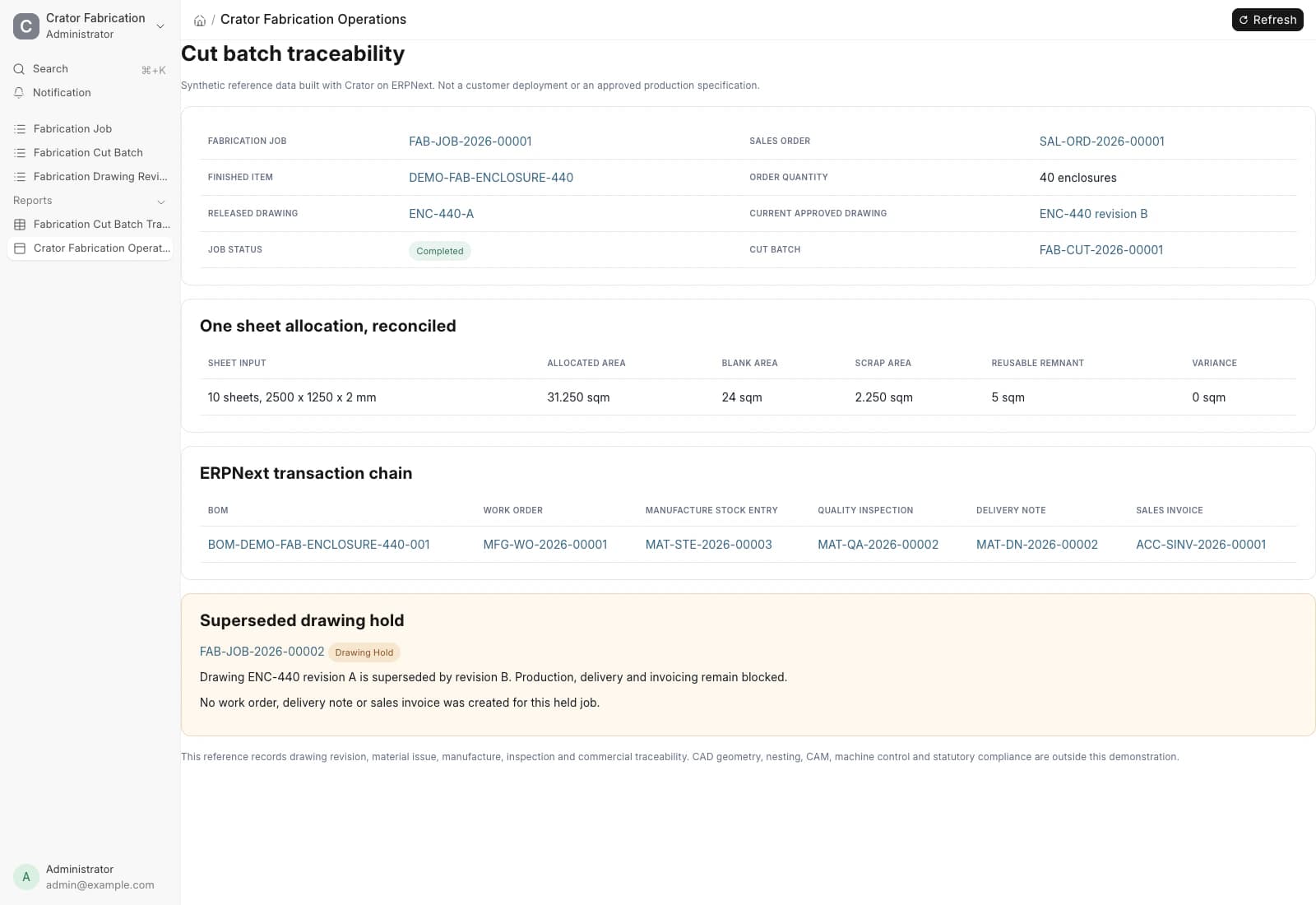
Ten sheets do not become only forty enclosures. Their 31.25 square metres have to reconcile into blanks, scrap and reusable remnant, with no unexplained variance.
The finished batch needs a transaction trace
The BOM, Work Order, material consumption, remnant output and Quality Inspection should resolve back to the same order and drawing rather than sit in separate files.
A hold must stop the commercial close
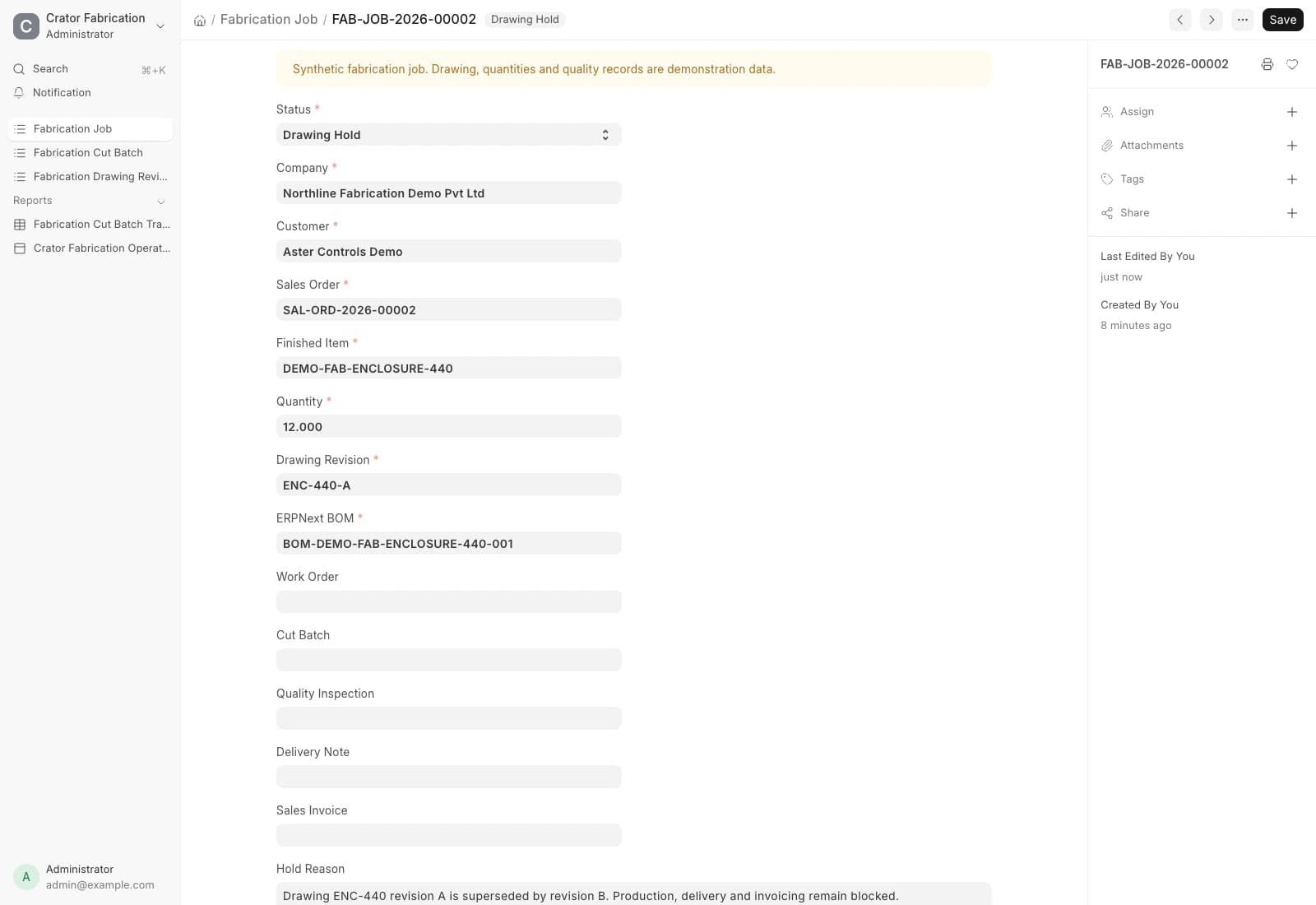
The held reference job has no Work Order, Delivery Note or Sales Invoice. The reason is visible on the job instead of being left to an email or production-floor memory.
Crator added those controls as a separate Frappe app. ERPNext remains the source of truth for the order, manufacturing, stock, quality, delivery and accounting records.
Cut batch control
Every allocated square metre gets an outcome
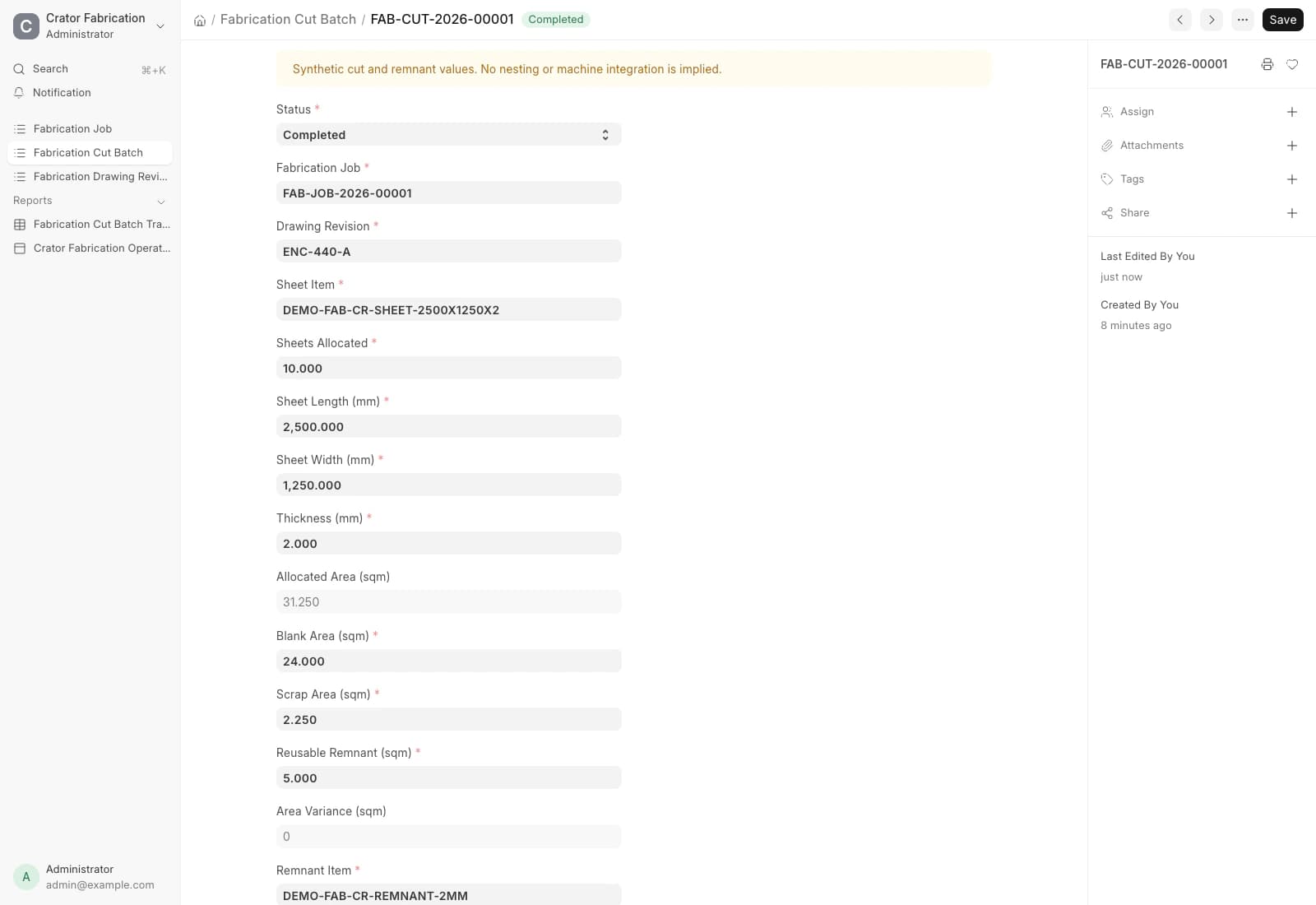
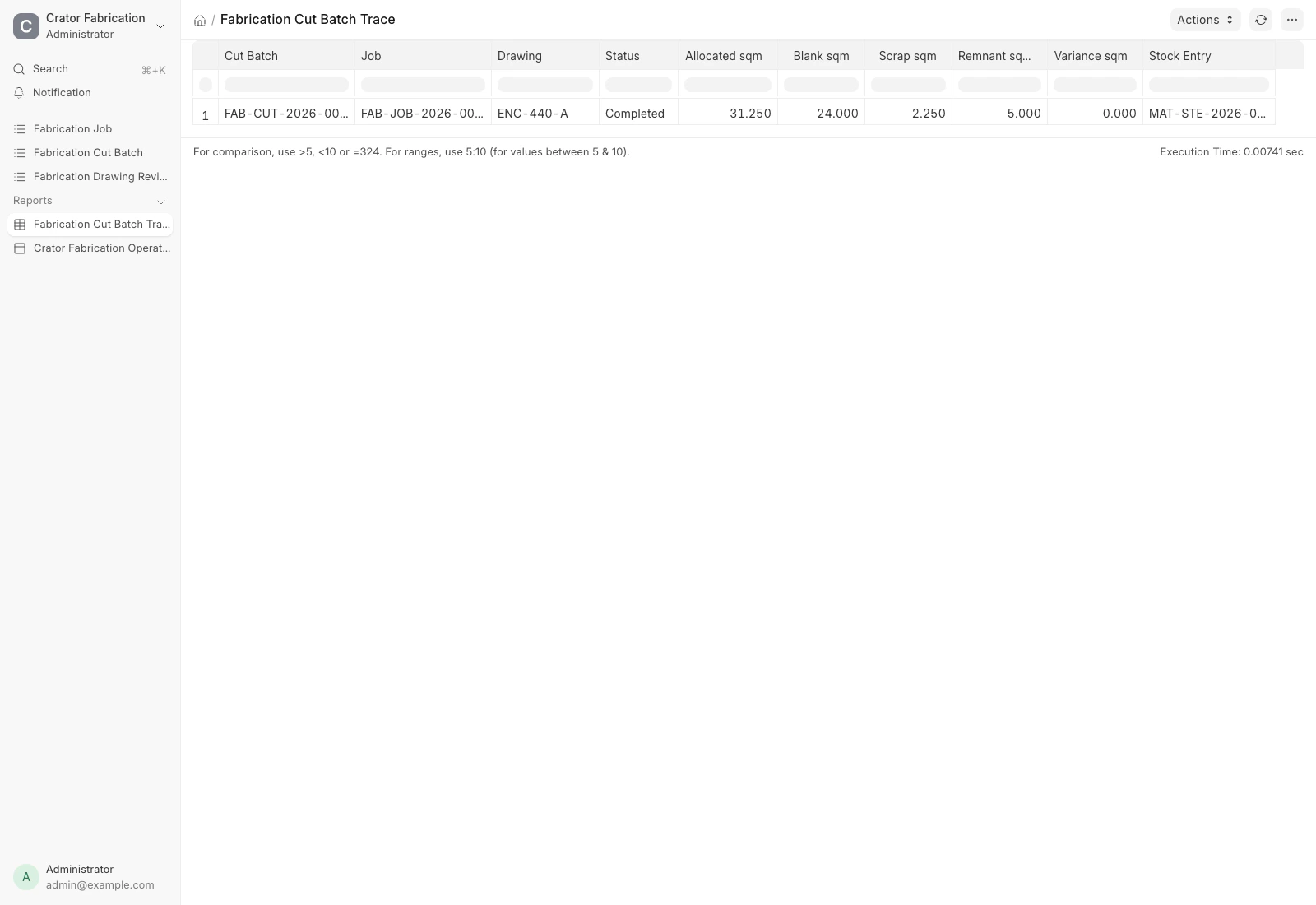
The reference allocates ten cold-rolled sheets measuring 2500 by 1250 by 2 millimetres. The cut batch reconciles 31.25 square metres into 24 square metres of blanks, 2.25 of scrap and 5 of reusable remnant. A completed batch with a non-zero variance is rejected.
ERPNext records the ten consumed sheets and returns the five-square-metre remnant to a reusable-remnant item and warehouse. This is material accounting, not a claim that the ERP has generated or optimised the cutting nest.
Drawing control
The superseded revision stops the second job before production
The completed 40-enclosure job preserves revision A as its historical release. We then approved revision B and tried to carry a separate 12-enclosure job forward on revision A. The job moved to Drawing Hold and the release validation rejected the superseded revision.
The control is deliberately early. The held job has its Sales Order and BOM context, but no Work Order, cut batch, Quality Inspection, Delivery Note or Sales Invoice.
Reconciliation evidence
The report makes remnant and scrap variance reviewable
The cut-batch trace report exposes the job, drawing, allocated area, blank area, scrap, reusable remnant, variance and linked Stock Entry in one row. Production and stores can investigate the same record without rebuilding the calculation in a spreadsheet.
Implementation
What Crator added to ERPNext
ERPNext supplies the commercial, manufacturing, stock, quality, delivery and accounting foundation. Crator adds the sheet-metal operating layer and its release and reconciliation rules without changing ERPNext core.
One fabrication operating system
ERPNext foundation
- Sales Order and finished Item
- BOM and Work Order
- Manufacture Stock Entry
- Quality Inspection
- Delivery Note and Sales Invoice
Crator fabrication layer
- Approved drawing revision
- Fabrication job release control
- Cut-batch sheet allocation
- Scrap and reusable-remnant reconciliation
- Superseded-drawing hold
For the broader software decision, read our guide to the best ERP options for manufacturing in India.
Production boundary
What still needs a real fabrication company decision
This is working fabrication ERP software, but it is not a claim of production readiness. A rollout still needs the company's drawing approval process, BOM and routing, tolerances, remnant dimensions, scrap disposition, subcontracting, user permissions, GST setup, print formats and acceptance tests.
CAD geometry, automatic nesting, CAM programs, laser or punch control, press-brake setup and statutory compliance are outside this reference. Crator can connect those systems only after the real interfaces, ownership and failure controls are defined.
The tested reference uses standard ERPNext records for bills of material, Work Orders, Quality Inspections and subcontracting. These sources inform the system boundary; they do not certify the synthetic reference for a real factory.
Frequently asked questions
It connects the customer order and approved drawing revision to the BOM, Work Order, material issue, cut batch, reusable remnant, manufacture, inspection, delivery and invoice. The useful trace explains which drawing and material allocation produced each finished batch.
Yes. ERPNext already provides Sales Orders, BOMs, Work Orders, Stock Entries, Quality Inspections, Delivery Notes and accounting. Crator adds the fabrication records and rules that connect those documents to drawing revisions, cut batches and sheet-area reconciliation.
The reference cut batch records sheet count and dimensions, then reconciles allocated area into blanks, scrap and reusable remnant. Its manufacture Stock Entry puts the reusable remnant back into a named ERPNext stock item and warehouse. A real rollout still needs the company to decide remnant identity, dimensions, storage and reuse rules.
No. This reference stores the approved drawing revision and material outcome, but it does not validate CAD geometry, generate a nest, create CAM programs or control a laser, punch or press brake. Those systems can be integrated after their interfaces and operating controls are known.
It is a working reference implementation built with Crator on ERPNext, not a fictional customer case study. We can hand over the app and adapt it, but routing, tolerances, machine data, subcontracting, GST, print formats, permissions and acceptance tests still need decisions from the real fabrication company.