ERP for textile wholesale and billing in India
We used Crator to build working textile ERP software around a denim wholesale order. It follows physical rolls and shade lots through reservation, a partial cut, reusable remnant, broker and credit context, dispatch and invoice. The screens below come from the installed ERP, not a design mockup.
Why textile billing software has to follow the physical roll
A fabric item can exist in stock as several rolls with different lengths, supplier lots and shades. The invoice may show one line, but stores still needs to know which rolls were reserved, cut and dispatched, and what usable material remains.
The roll is the stock identity
Two rolls of the same denim item can have different metre lengths, weights, supplier lots and shade lots. Allocation has to happen at that physical level.
Shade compatibility comes before dispatch
Available stock is not automatically suitable stock. A different shade must remain blocked until the customer accepts it or the original shade is replenished.
Metres and kilograms need one approved conversion
Commercial quantity may be discussed in both units. The conversion has to be explicit and reconciled across the order, roll allocation and remnant.
A partial cut creates reusable stock
The unused portion cannot disappear into a note. It needs a measurable remnant record, warehouse location and link back to the source roll and customer order.
Crator adds those controls in a separate Frappe app. ERPNext remains the source of truth for batches, stock reservation, delivery, billing, customer credit and accounts.
Roll identity
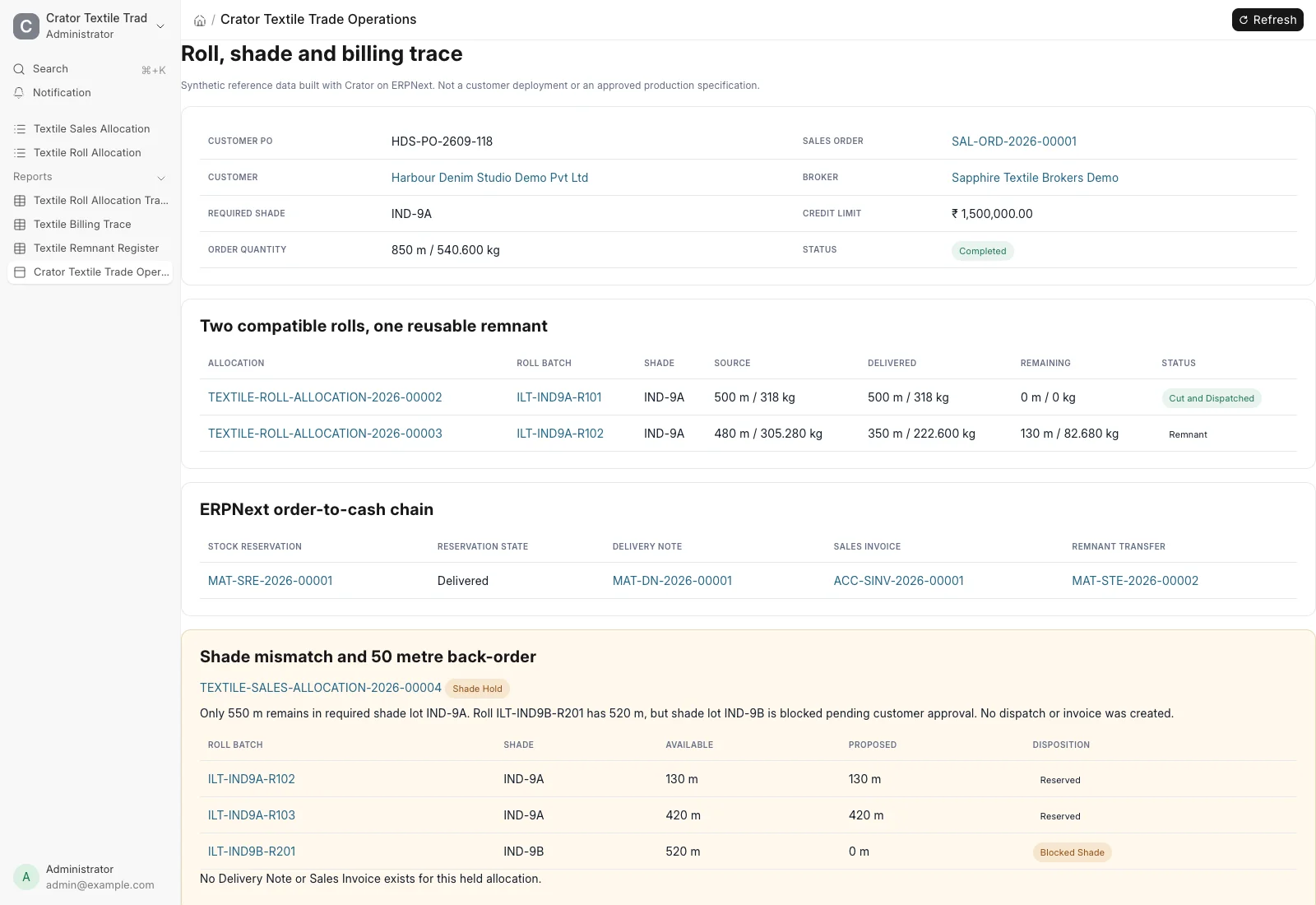
One 480 metre roll becomes a 350 metre dispatch and a 130 metre remnant
Standard ERPNext Batch records carry the four physical roll identities. The Crator roll allocation records the required shade, supplier lot, source quantity, approved unit conversion, reserved quantity, dispatched quantity and remaining quantity.
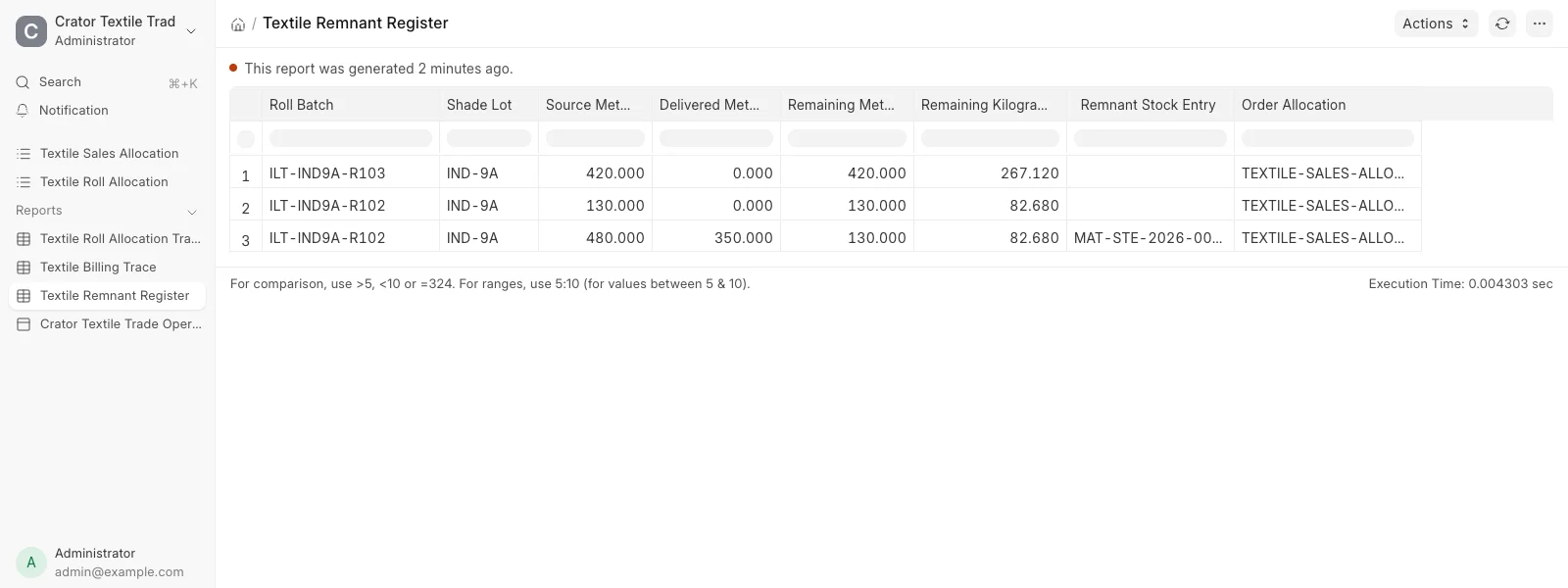
Roll ILT-IND9A-R102 begins with 480 metres. The order consumes 350 metres and the exact 130 metre, 82.680 kilogram balance links to its remnant Stock Entry. Every name and value on this page is synthetic reference data.
Reservation and dispatch
The commercial order closes through standard ERPNext documents
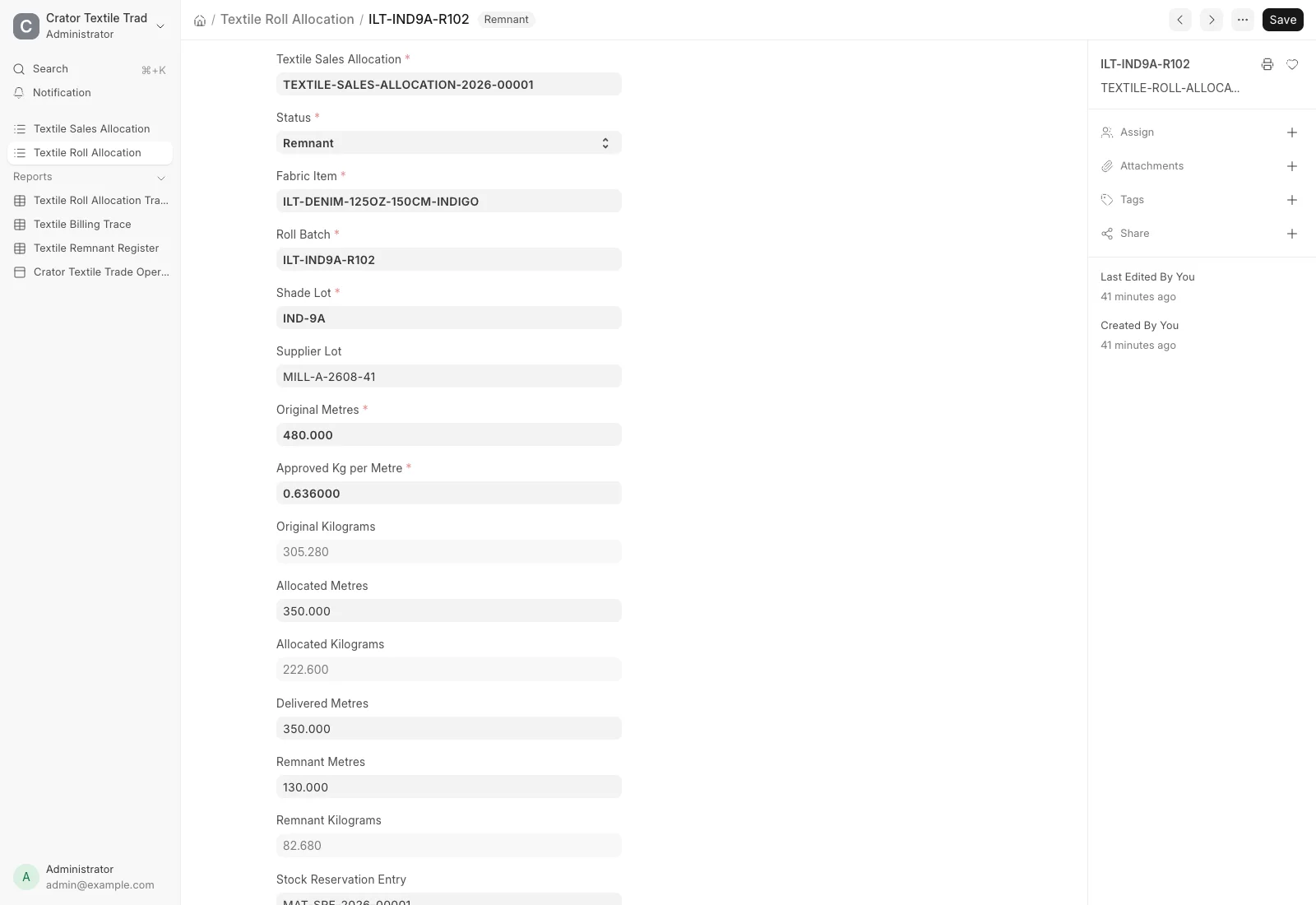
The submitted Sales Order requests 850 metres. A submitted Stock Reservation Entry reserves 500 metres from roll R101 and 350 metres from roll R102 before the Delivery Note uses those same two Batch identities.
ERPNext then records the Sales Invoice for ₹586,500. The Crator layer does not replace stock or accounting. It makes the textile-specific allocation visible around those standard transactions.

Remnant control
Usable cut balance returns to stock instead of disappearing into a note
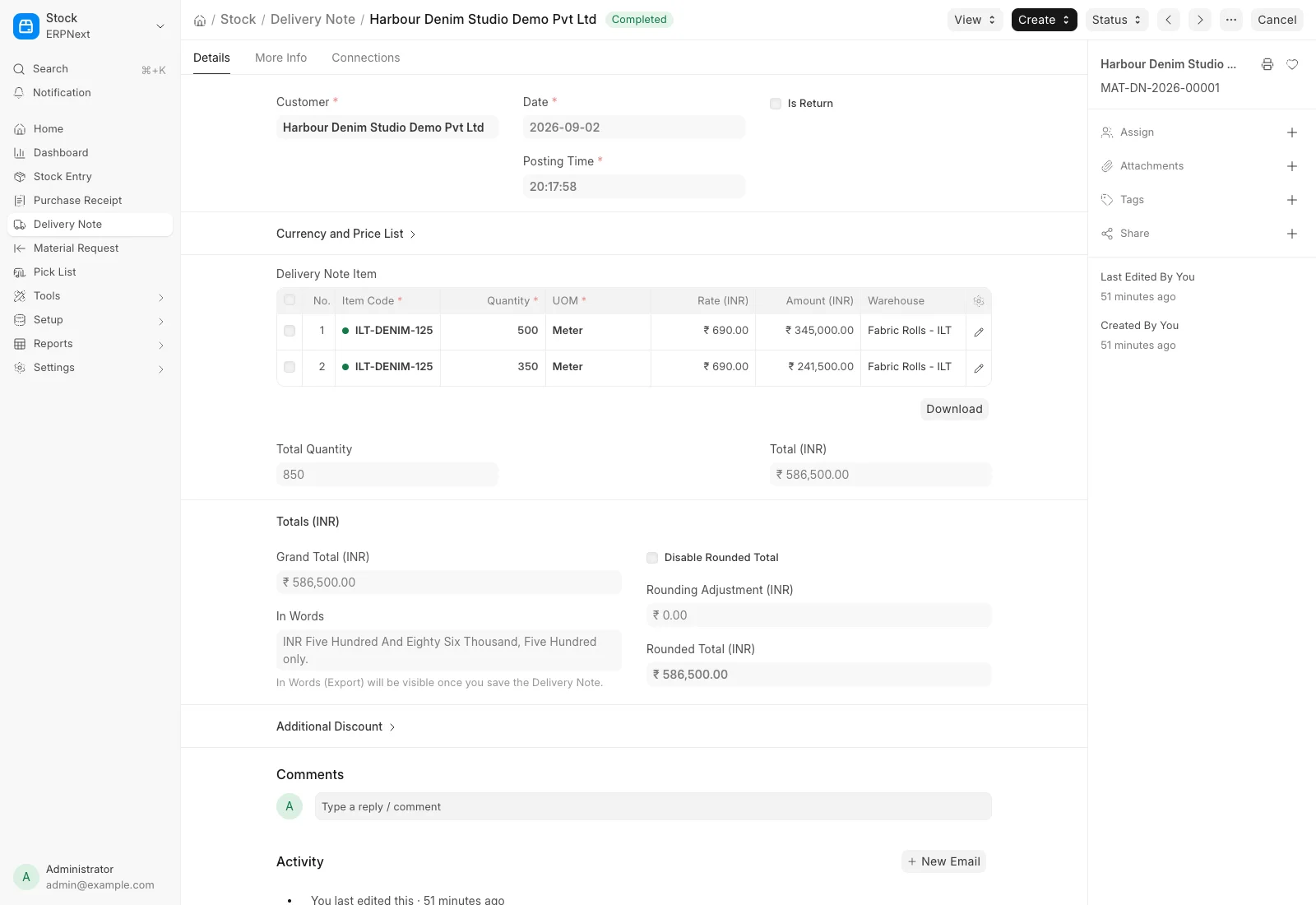
A submitted ERPNext Stock Entry moves the remaining 130 metres from the main roll warehouse into the Cut Remnants warehouse. The remnant report exposes the source quantity, delivered quantity, remaining metres and kilograms, Stock Entry and order allocation.
This reference preserves the accounting trail. A real wholesaler still has to decide when a cut piece remains sellable, how it is labelled, where it is stored and when it should be written off.
Shade exception
A full warehouse is not enough when the required shade is short
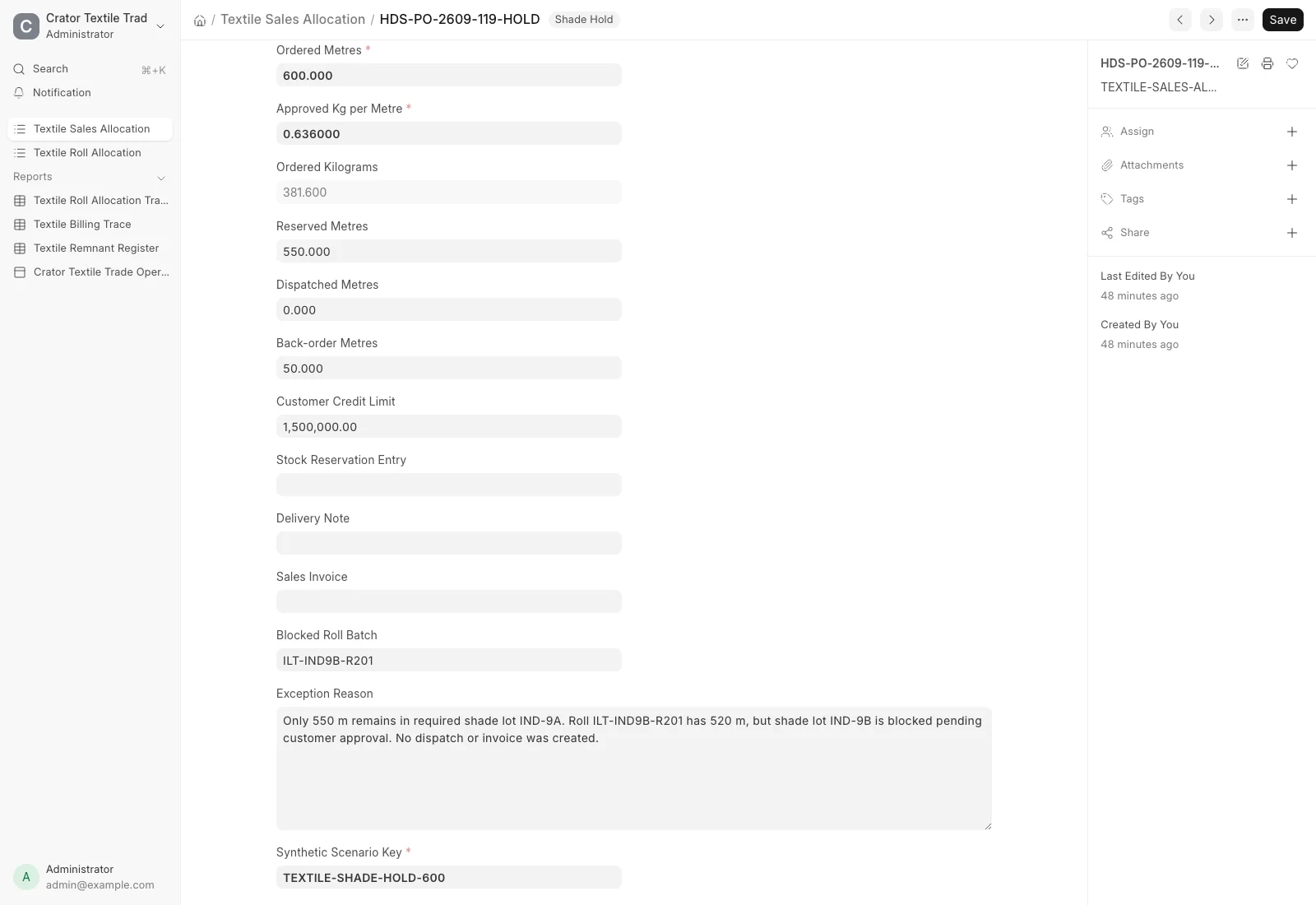
The second synthetic Sales Order requests 600 metres in shade IND-9A. Only 550 compatible metres remain. Roll R201 has another 520 metres, but it belongs to shade IND-9B, so the allocation stays on Shade Hold with a 50 metre back-order.
No Stock Reservation Entry, Delivery Note or Sales Invoice is created for the held order. The system preserves the available wrong-shade roll without silently substituting it.
Billing reconciliation
The report separates the completed bill from the unresolved order
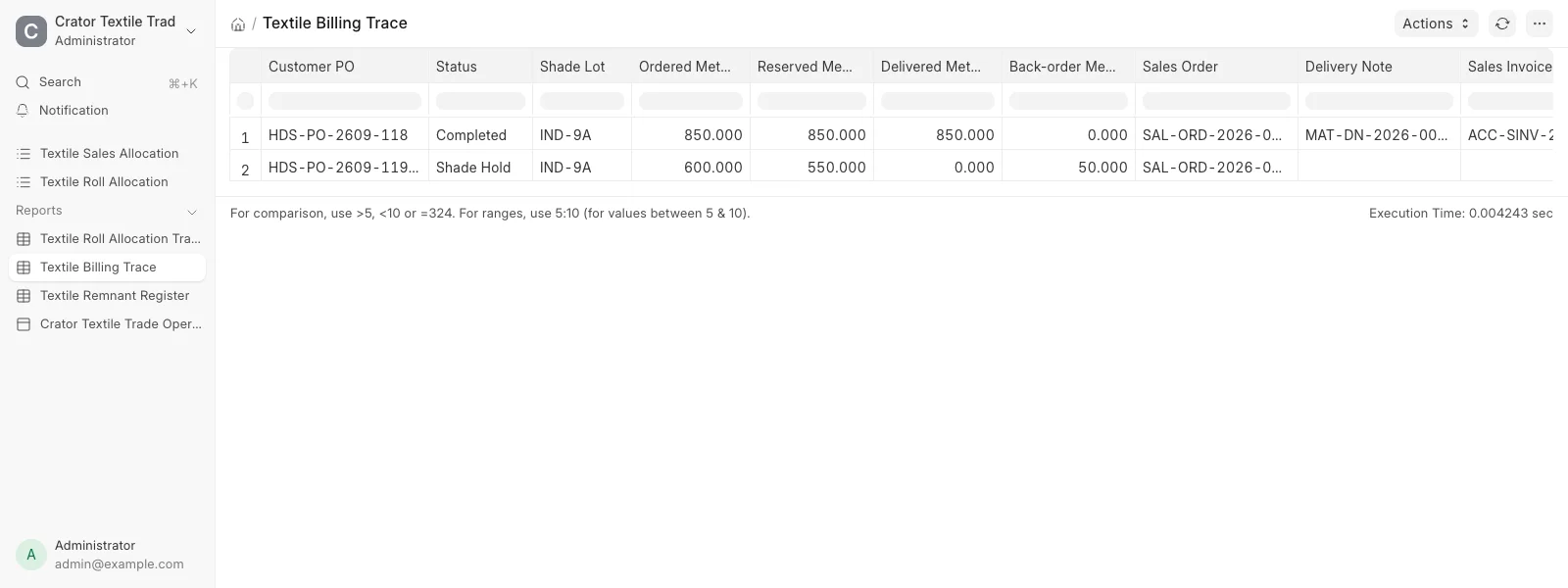
The billing trace puts ordered, reserved, delivered and back-order metres beside the Sales Order, Delivery Note and Sales Invoice. The completed order closes at 850 metres. The held order remains at zero delivered with 50 metres outstanding and no commercial close.
Implementation
What Crator added to ERPNext
ERPNext supplies the inventory, sales, delivery, billing, credit and accounting foundation. Crator adds the textile roll allocation and the controls that reconcile shade, dual units, cut remnants and blocked substitutions without changing ERPNext core.
One textile billing system
ERPNext foundation
- Item, alternate UOM and Batch
- Warehouse and Stock Entry
- Sales Order and stock reservation
- Delivery Note and Sales Invoice
- Customer credit limit and accounts
Crator textile layer
- Physical roll and supplier-lot trace
- Required shade and compatibility control
- Metre and kilogram reconciliation
- Partial-cut and remnant identity
- Broker context and wrong-shade hold
For the broader software decision, read our guide to the best ERP options for manufacturing in India.
Production boundary
What still needs a real textile company decision
This is working textile billing software, but it is not a claim of production readiness. A rollout still needs approved roll naming, shade acceptance, metre and kilogram conversion, actual weighing rules, partial-cut policy, remnant labels, broker commission, credit release, pricing, GST, e-invoice and e-way bill setup, permissions, print formats and acceptance tests.
Barcode and QR scanning, weighing scales, mill systems, fabric inspection machines, lab and shade approvals, transport integrations, spinning, weaving, dyeing, CAD, CAM and production planning are outside this reference. Real interfaces need customer-specific mapping, retries, reconciliation and operating ownership.
The tested reference uses standard ERPNext records for Batch tracking, stock reservation, Delivery Notes and Sales Invoices. These sources support the document boundary. They do not certify the synthetic values or the app for a real textile business.
Frequently asked questions
For a fabric or denim wholesaler, it can connect the customer order and broker to roll-level stock, shade lots, reservation, partial cutting, reusable remnants, dispatch and invoice. The useful trace explains exactly which physical rolls satisfied each billed order.
Yes. ERPNext already provides Items, alternate units of measure, Batches, warehouses, Sales Orders, stock reservation, Delivery Notes, Sales Invoices, customer credit limits and accounting. Crator adds the textile allocation, roll, shade and remnant records that connect those standard documents.
Yes, when the business has an approved conversion for that item or roll. This reference stores metres as the stock unit and shows kilograms using a synthetic fixed conversion of 0.636 kilograms per metre for one denim item. A real implementation must use the company's approved conversion method and decide how actual roll weights override planned values.
The completed order reserves two compatible IND-9A rolls, dispatches 850 metres and transfers the remaining 130 metres into a named remnant warehouse. The separate exception has only 550 metres in the approved shade and blocks an available IND-9B roll, leaving a visible 50 metre back-order with no dispatch or invoice.
No. The reference records roll and batch identity, but it does not claim a live barcode, QR, weighing-scale, mill, laboratory or shade-approval integration. Those interfaces need the actual device protocol, identity rules, retries, reconciliation and release ownership before production use.
It is a working reference implementation built with Crator on ERPNext, not a fictional customer case study. We can hand over and adapt the app, but the real textile company still has to approve its roll identity, shade rules, unit conversions, cut and remnant policy, broker commissions, credit controls, GST setup, permissions and acceptance tests.