ERPNext v16 Accounting: what changed from v15
· Yajat Gulati · 9 min read
Cover image: Frappe's official ERPNext v16 release page.
ERPNext v16 gives finance teams more control over the reports and policies around the ledger. The release adds Financial Report Templates, a consolidated trial balance, reporting-currency values, a redesigned budget model and a new tax-withholding structure. It also moves several settings onto the Company record, so the same site can represent different accounting policies more directly.
This is a useful release for finance teams, but the underlying record changes deserve more attention than the new menus. An integration that reads invoice tax details, a report built around the old budget structure, or a customization that expects controls in their old location can continue to run while producing the wrong result after migration.
Financial statements become configurable records
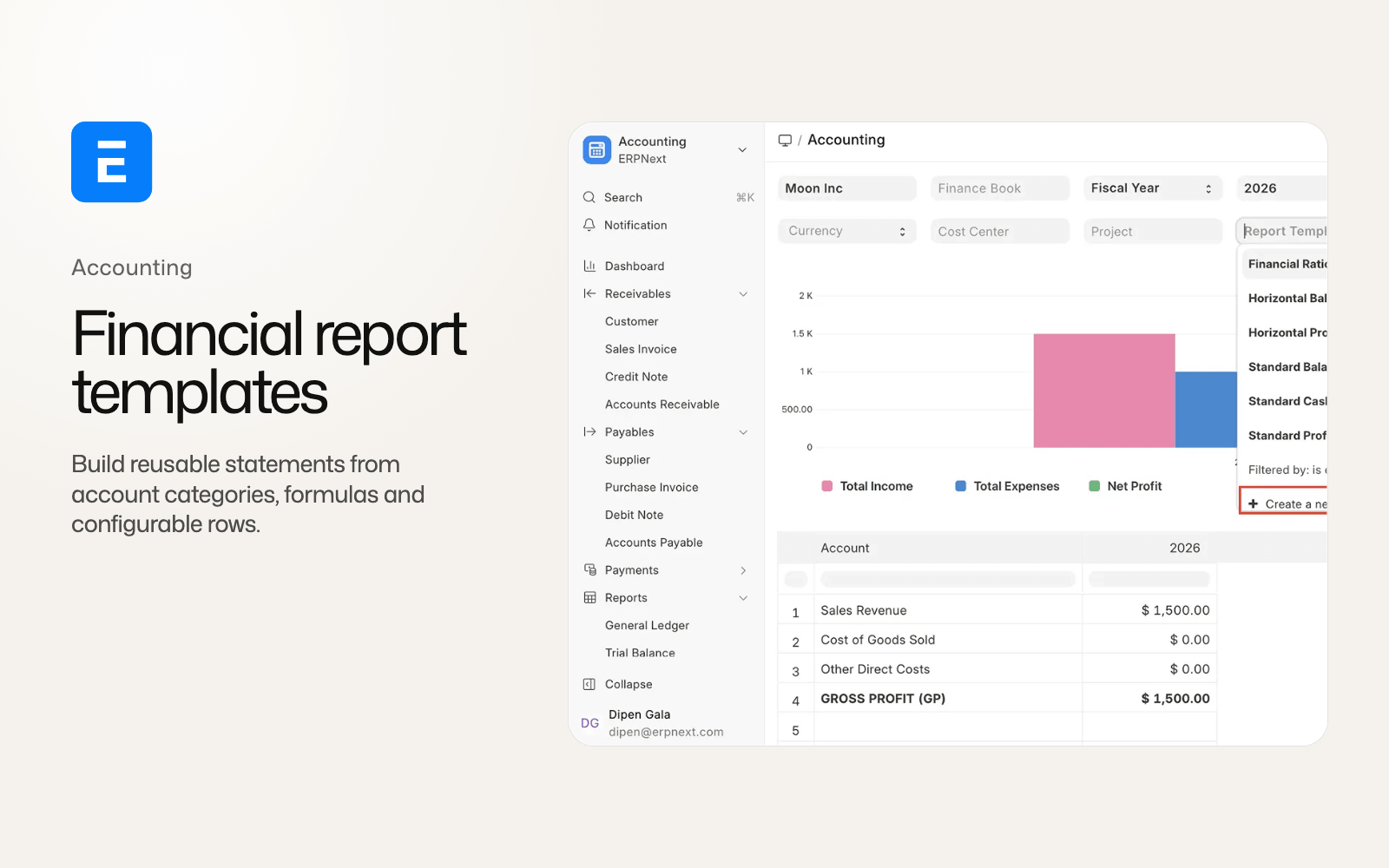
In v15, a finance team can filter standard reports and build separate custom reports, but changing the structure of a financial statement usually means maintaining another report. ERPNext v16 adds Financial Report Template and Financial Report Row records so the presentation can be configured as data.
A template can pull account data, calculate a value with a formula, add a custom calculation, insert a section break or hide a row when it has no value. Rows also carry presentation and accounting choices such as indentation, bold text, sign reversal, and opening, closing or period-movement balances. ERPNext ships standard IFRS Balance Sheet, Profit and Loss and Cash Flow templates, plus columnar variants and a financial-ratios analysis.
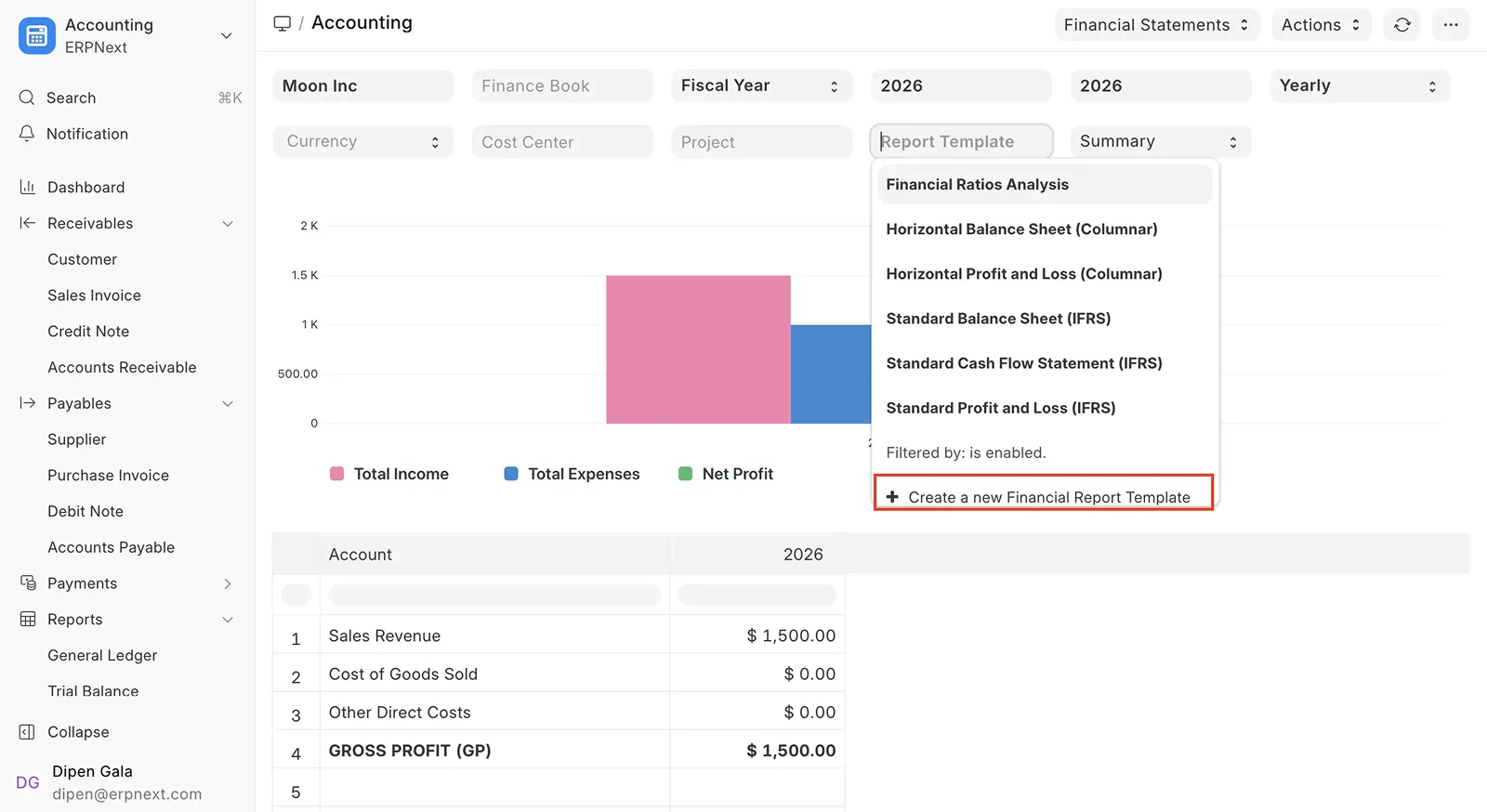
Financial Report Templates shown on Frappe's ERPNext v16 release page.
The change separates financial presentation from the general ledger. A group can present a management statement without replacing the underlying ledger report. The control still belongs with finance: every formula and account category needs review, and a new template should be reconciled against the standard report before it becomes part of a close or statutory process.
The same work adds Account Category records, which map accounts to categories and categories to template rows. That gives a report a reusable classification layer instead of a long list of hard-coded account names. Existing accounts receive migrated categories, but a finance team should review the resulting mapping, particularly where a chart of accounts has local naming conventions.
Consolidation and reporting currency reach the ledger
Version 16 adds Consolidated Trial Balance for child-company consolidation and currency conversion. It also adds a reporting currency on Company and stores debit and credit values in that currency on General Ledger Entries.
The mechanism changes posting behavior. When reporting currency is configured, ERPNext needs a Currency Exchange record for the company currency and reporting currency. Missing exchange-rate data can block a posting rather than leave the report with an incomplete conversion. The result is a better foundation for group reporting, but it also turns exchange-rate master data into a posting dependency.
Before upgrading, list every company that will use reporting currency and define who maintains the exchange-rate records. Compare a representative month of foreign-currency invoices, payments, journal entries and advances before and after migration. Advance Payment Ledger Entry also gains a base amount and exchange rate, so advance reconciliation belongs in the test set.
Several controls move from global settings to Company. Account freezing now uses the Company's accounts closing controls and a role allowed to post in frozen periods. Stock valuation method also moves from Stock Settings to Company and adds LIFO as an option. Default work-in-progress, finished-goods and scrap warehouses move from Manufacturing Settings to Company. These changes make per-company policy more explicit, but integrations built around the old settings need a deliberate update.
Tax withholding gets a new data model
Tax withholding is one of the most important v15 to v16 integration changes. The old flow spread withholding information across document fields and older doctypes. Version 16 adds Tax Withholding Entry rows with party, category, rate, taxable amount, certificate use and under-or-over-withheld reasons.
The rows can be used on Purchase Invoice, Sales Invoice, Payment Entry and Journal Entry. That widens the documents that can carry withholding and gives an accounting team a consistent place to inspect the calculation. Tax Withholding Group records add another layer for grouping the applicable setup.
This is a data migration. Purchase Invoice no longer carries its old document-level withholding category, while older advance-tax and tax-withheld-voucher records move into the v16 model. The tax category also gains a tax deduction basis, such as gross or net total, and controls for disabling a threshold.
Test actual transactions across a purchase invoice, a sales invoice, a payment entry and a journal entry with withholding. Check the taxable amount, rate, certificate path, payable or receivable balance and the resulting ledger rows. If an integration extracts withholding fields directly, replace those reads with the new child-table model.
Item-wise tax detail becomes a child table
ERPNext v15 keeps item-wise tax detail inside the tax row. In v16, the detail becomes an Item Wise Tax Detail child table on sales and purchase documents.
The child table is easier to inspect and validate, but integrations built around the old tax format need to change. Version 16 can also stop a document when item-wise tax details do not match the Taxes and Charges rows after rounding. That is safer for accounting accuracy, especially where several tax rates or item-level rounding rules meet, but it may expose assumptions in custom invoice creation.
Review print formats, tax reports, integration jobs and every connection that copies invoice taxes into another system. Send documents with multiple tax rows, discounts, returns and fractional quantities through the staging site. Compare both the document totals and the individual tax allocations.
Budgets move to date ranges and revision chains
The v15 budget model uses fiscal-year and monthly-distribution data. Version 16 represents a budget with an account, a date range and a Budget Distribution table. Users can distribute an amount equally, edit the distribution and revise an existing budget through a revision chain.
The new budget rules validate cumulative expense during General Ledger posting. The legacy behavior remains available through an Accounts Settings switch, but the new path is the default after migration. This matters to businesses that post across several cost centres or need a budget that starts or ends partway through a fiscal year.
A migration check should compare the old monthly distribution with the new date range and distribution rows. Then post a transaction before the start date, inside the budget, over the cumulative limit and after the end date. Confirm the configured over-budget action and the bypass role, if one exists. A budget report that looks correct while posting validation is wrong is not a successful accounting migration.
Smaller controls with large operational effects
Accounts Settings gains switches that show or hide feature sections across documents. Accounting Dimensions, Discounts and Margin, Loyalty Point Program, Subscriptions and Overdue Billing Threshold can be enabled or hidden centrally. Confirm Before Resetting Posting Date is enabled by default in v16.33.
Purchase expense booking also changes. Company-level expense and contra accounts, together with the Accounts Settings option to book stock-expense GL entries, support a simpler cost-of-goods-sold flow. The account design should be reviewed with the person responsible for inventory valuation because the resulting entries affect both profit and stock reporting.
Accounts Receivable adds a not-yet-due ageing bucket, sticky columns and stronger Sales Person user-permission enforcement. Accounting Period can be disabled and can define an exempted role for closed-period posting. These are small interface and control changes, but they belong in a month-end rehearsal because they affect who can post and how overdue balances are interpreted.
What finance teams should test before upgrading
The official ERPNext v16 migration guide and Frappe Framework migration guide are the starting points. They do not replace a site-specific rehearsal.
Run the following in a restored staging copy:
- Reconcile a closed period's Trial Balance, Balance Sheet, Profit and Loss and Cash Flow in the standard reports and any new templates.
- Test foreign-currency invoices, payments, advances and reporting-currency exchange rates for each company.
- Recreate withholding transactions across Purchase Invoice, Sales Invoice, Payment Entry and Journal Entry.
- Check item-wise tax details in every custom integration and report that reads invoice taxes.
- Migrate and revise budgets, then test posting at each boundary.
- Check account freezing, closed periods, user permissions, dimensions, purchase-expense booking and print formats.
- Record the exact ERPNext and Frappe Framework point releases, and test a backup restore before the cutover decision.
Custom applications also need compatibility review for permissions, integrations and replaced standard workspaces. A completed migration is one checkpoint. Financial reconciliation is the next.
Is ERPNext v16 accounting worth the upgrade?
For a new implementation, v16 is the sensible accounting baseline because it is the current supported major release and has configurable statements plus a clearer model for consolidation and reporting currency. For an existing v15 site, the case is strongest when the business needs report templates, multi-company reporting, richer withholding or date-based budgets.
The case is weaker when critical integrations still depend on the old tax format, old withholding fields or global settings, or when the team cannot schedule a staging rehearsal. ERPNext v15 is still under Frappe's planned support window through the end of 2027, so a controlled delay can be responsible while those dependencies are updated.
The accounting improvements are concrete. They also move more policy into records that need ownership. The upgrade is ready when finance can reconcile the numbers and the team can explain who maintains each new control.
ERPNext v16 accounting FAQ
What is the biggest accounting change in ERPNext v16?
Financial Report Templates are the most visible change. They let finance teams configure statement rows, formulas, account categories and layouts without replacing the underlying ledger report.
Does ERPNext v16 change tax withholding?
Yes. Tax Withholding Entry child rows extend withholding across purchase, sales, payment and journal documents. Older withholding fields and doctypes are migrated, so custom integrations need review.
Does ERPNext v16 support reporting currency?
ERPNext v16.33 adds Company reporting currency and stores reporting-currency debit and credit values on General Ledger Entries. Currency Exchange data is required for posting when the feature is configured.
Are ERPNext v15 budgets compatible with v16?
ERPNext migrates the budget data to the new date-range and Budget Distribution model. Validate the migrated distributions, revisions and over-budget posting behavior in staging.
Should an existing v15 site upgrade now?
Upgrade when accounting reports, taxes, integrations and restore procedures pass a site-specific staging rehearsal. Staying on v15 for a controlled period is reasonable when those checks are not complete.
For the wider product comparison, read ERPNext v16 vs v15: the changes that alter daily work.