ERPNext v16 vs v15: the changes that alter daily work
· Yajat Gulati · 13 min read
Cover artwork: Frappe's official ERPNext v16 release page.
ERPNext v16 was released on 12 January 2026, the first major release in two years. The immediate difference from v15 is the new Desktop and navigation. The more consequential changes sit inside accounting, manufacturing, stock, subcontracting and the data structures that custom applications depend on.
The short answer is that v16 is a substantial operational release. Finance teams get configurable financial statements and deeper reporting controls. Manufacturers get a planning chain from forecasts to MRP, better support for semi-finished goods and multiple outputs, and inward subcontracting. Stock reservations and traceability reach more workflows. POS remains in ERPNext and now supports two invoice workflows.
An upgrade still deserves a staging run. ERPNext v15 remains under planned support through the end of 2027, so a company with critical custom applications does not need to trade a controlled system for a rushed migration.
What this ERPNext v16 vs v15 comparison covers
This guide compares ERPNext v15.120.0 with v16.33.0 as available on 31 August 2026. Version 16.33.0 includes more than seven months of fixes and point releases after v16.0.0, so some capabilities arrived after the original January release.
The article uses three status labels:
- Shipped in v16: part of Frappe's official Version 16 release.
- Available by v16.33: part of ERPNext v16.33, without claiming it was present on release day.
- Framework v16: inherited from Frappe Framework rather than built as an ERPNext module feature.
The new Desktop, persistent sidebar, Chrome-based PDF generation, permission changes and many list-view improvements come from Frappe Framework. Financial Report Templates, MRP, inward subcontracting and the changed POS behavior belong to ERPNext.
ERPNext v16 vs v15 at a glance
| Area | ERPNext v15 | ERPNext v16 | Consequence | Status |
|---|---|---|---|---|
| Navigation | Workspace-led navigation under /app | Desktop icons, persistent sidebars and /desk | Familiar routes and customized workspaces need review | Framework v16 |
| Financial statements | Fixed standard report structures | Configurable Financial Report Templates and standard IFRS templates | Finance teams can shape presentation without replacing the ledger report engine | Shipped in v16 |
| Manufacturing planning | Production Plans and Material Requests | Sales Forecast, Master Production Schedule and an expanded MRP report | Demand can flow into dated purchase and work-order decisions | Shipped in v16 |
| Multi-output manufacturing | Scrap-oriented secondary output model | Co-products, by-products, scrap and additional finished goods with cost allocation | Process manufacturers can model output and cost more directly | Available by v16.33 |
| Subcontracting | Outward subcontracting | Outward plus inward job work using customer-supplied material | Customer material can be tracked through production, delivery and return | Shipped in v16 |
| Stock control | Sales-order-focused reservation and existing serial/batch reports | Broader reservation plus backward and forward traceability | Production and subcontracting demand can reserve stock and trace movement | Shipped in v16 |
| POS | POS Invoice workflow | POS Settings adds a Sales Invoice mode, while upgraded sites stay on POS Invoice unless changed | Integrations must verify which DocType checkout creates | Available by v16.33 |
| Banking | Desk tools for import and reconciliation | A dedicated Banking interface adds import, matching and rule workflows | Bank close work moves into a focused application surface | Available by v16.33 |
| CRM and Support | Core ERPNext modules | v16 warns about removal, but both modules remain in the current v17 preview | Teams can plan around parity instead of treating v17 as a confirmed deletion date | Current product direction |
Navigation changes before any transaction does
Version 15 puts Workspaces at the centre of Desk. Users move through pages such as Accounting, Selling, Buying, Stock and Manufacturing, often following nested workspace links and shortcut cards.
Version 16 lands on /desk and uses a grid of product and module icons. Opening an area brings up a persistent sidebar with its documents, reports, settings and dashboards. Accounting is divided into surfaces such as invoicing, payments, financial reports, taxes, budgets and banking.
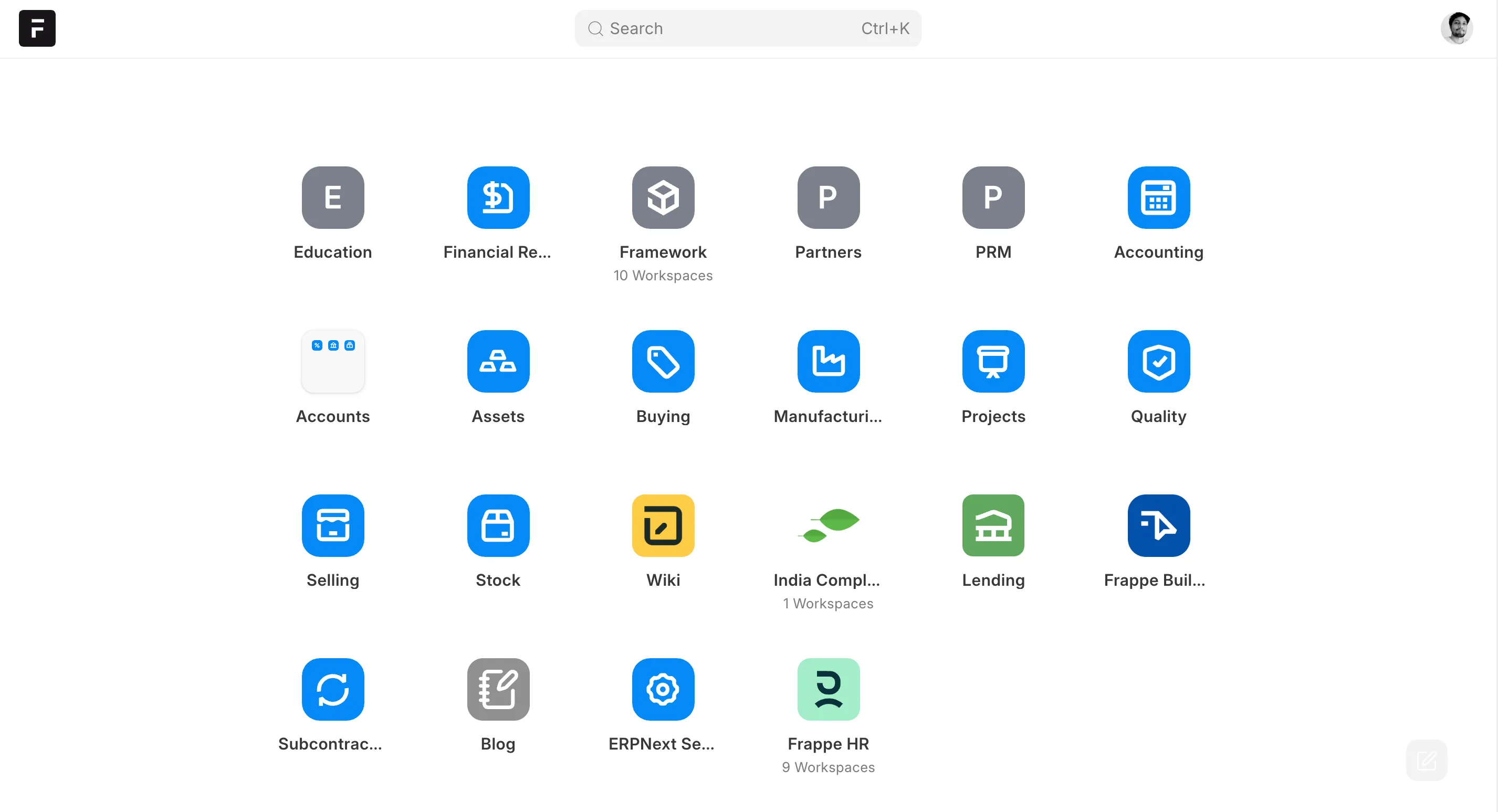
The v16 Desktop shown in Frappe's release announcement.
For a new user, this can make the product map easier to see. For an experienced v15 user, it changes the muscle memory built around workspaces. Customized standard workspaces need special attention because the Framework migration guide warns that migration replaces them.
Navigation is also one of the areas still moving. Our ERPNext keynote coverage from Frappeverse Mumbai 2026 includes later navigation and product work that should not be confused with the January v16.0.0 state. A useful upgrade test should therefore record both the ERPNext and Framework point releases being evaluated.
Accounting moves from fixed reports to configurable statements
The strongest accounting addition is the Financial Report Template. In v15, companies can filter and customize reports, but changing the structure of a financial statement usually means writing or maintaining a custom report.
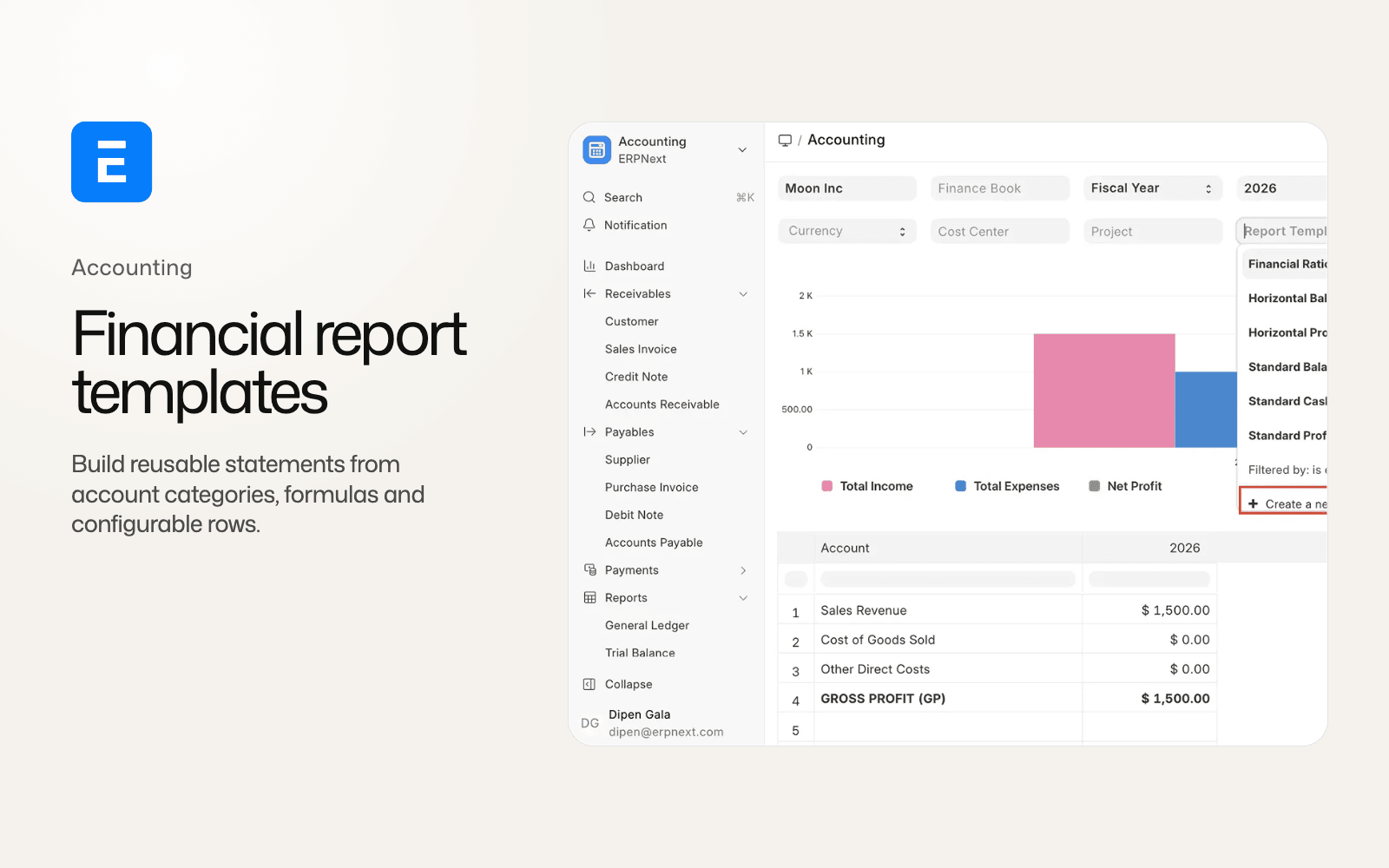
Version 16 adds Financial Report Template and Financial Report Row records. A row can draw account data, calculate an amount, call a custom API, create a visual break, reverse a sign or hide itself when empty. ERPNext ships standard IFRS Balance Sheet, Profit and Loss and Cash Flow templates, alongside columnar layouts and a financial-ratios analysis.
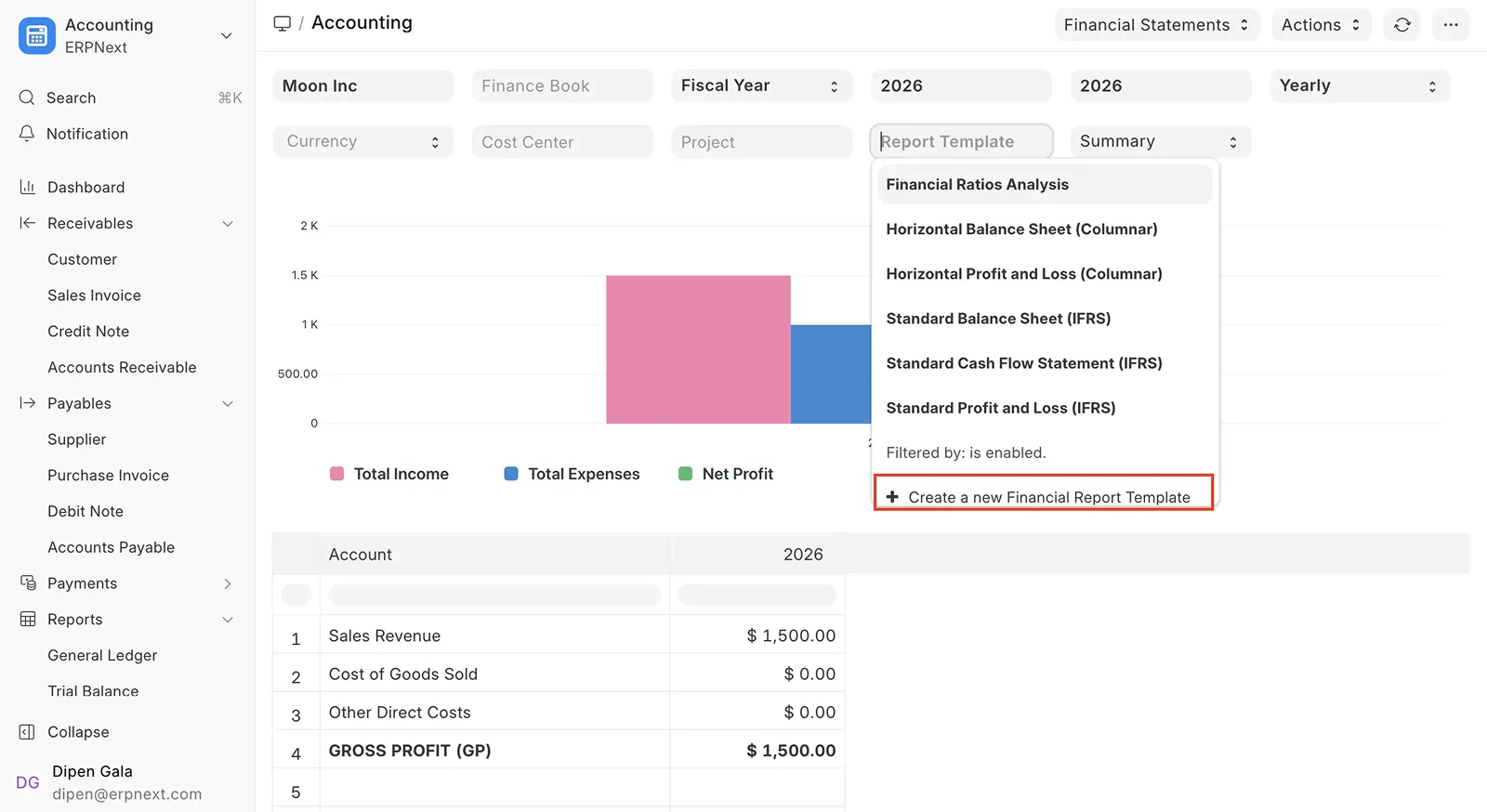
Financial Report Templates on Frappe's ERPNext v16 release page.
Templates preserve the accounting report underneath. A finance team can change presentation and calculated rows without maintaining a separate custom report for every statement. The result still needs reconciliation against the general ledger before a template becomes a management or statutory report.
Other accounting changes reach further into posting and integrations:
- Budget records can cover a date range, use editable distributions and retain revision chains.
- A company can define a reporting currency, with reporting-currency values stored on General Ledger Entries. Missing exchange-rate data can block posting when the feature is configured.
- Consolidated Trial Balance supports child-company consolidation and currency conversion.
- Item-wise tax detail moves into a relational child table.
- Tax withholding uses detailed child rows across more accounting documents.
- Several controls, including account freezing and stock valuation method, move from global settings to the Company record.
Any integration that reads invoice tax detail, expects old withholding fields or fetches company controls from their old location needs review. Frappe's ERPNext v16 migration guide specifically calls out the item-wise tax and withholding changes.
Our ERPNext v16 accounting comparison follows the close workflow across report templates, reporting currency, budgets, tax withholding and purchase-expense posting.
Manufacturing gains a planning layer
ERPNext v15 already has BOMs, Work Orders, Job Cards, Production Plans and material planning. Version 16 connects those records through a more explicit demand-planning chain.
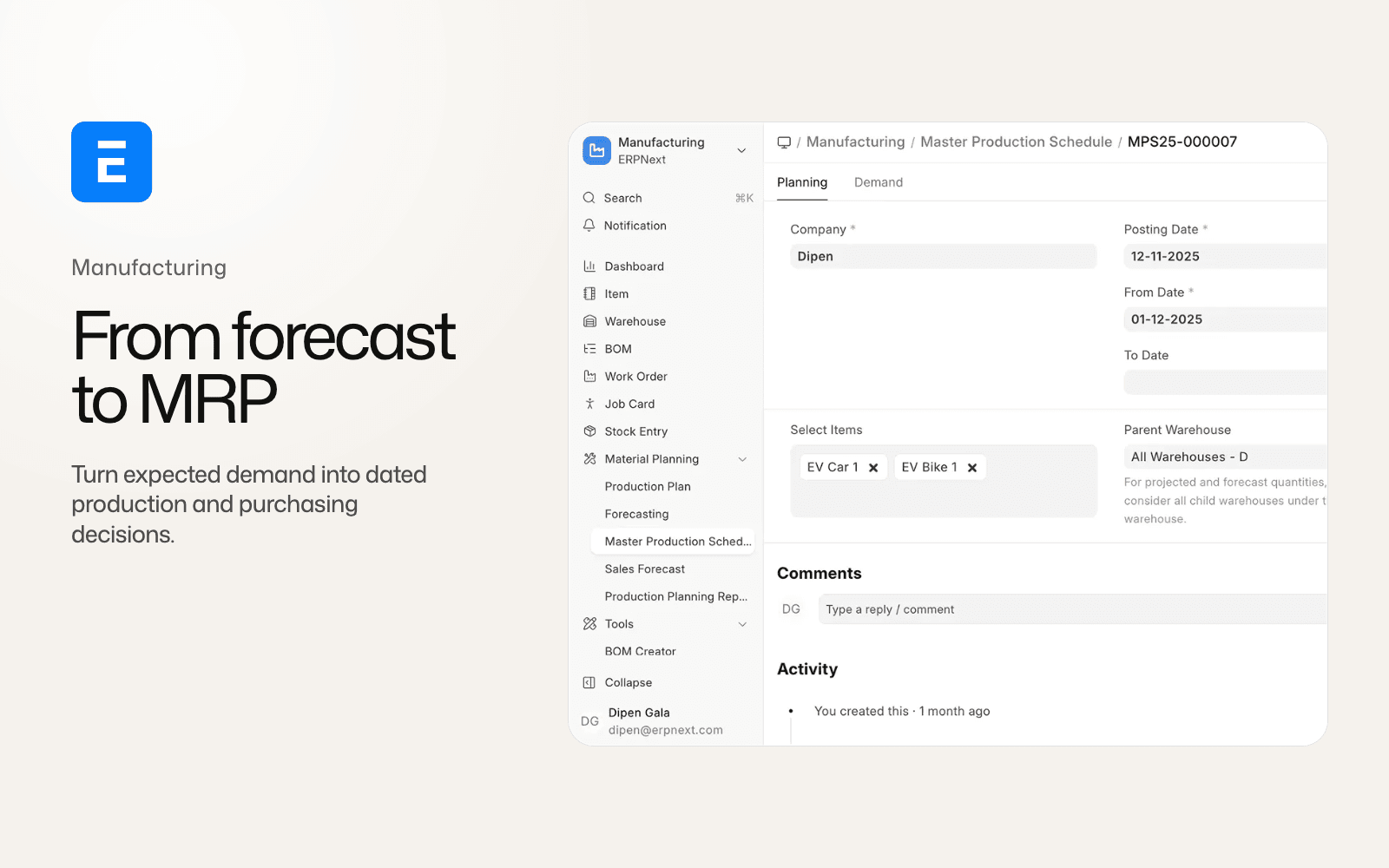
A Sales Forecast can generate demand by week or month. A Master Production Schedule can combine that forecast with Sales Orders and Material Requests, account for lead times, and feed a Material Requirements Planning report. The MRP report groups demand into time buckets and can create Purchase Orders or Work Orders from the result.
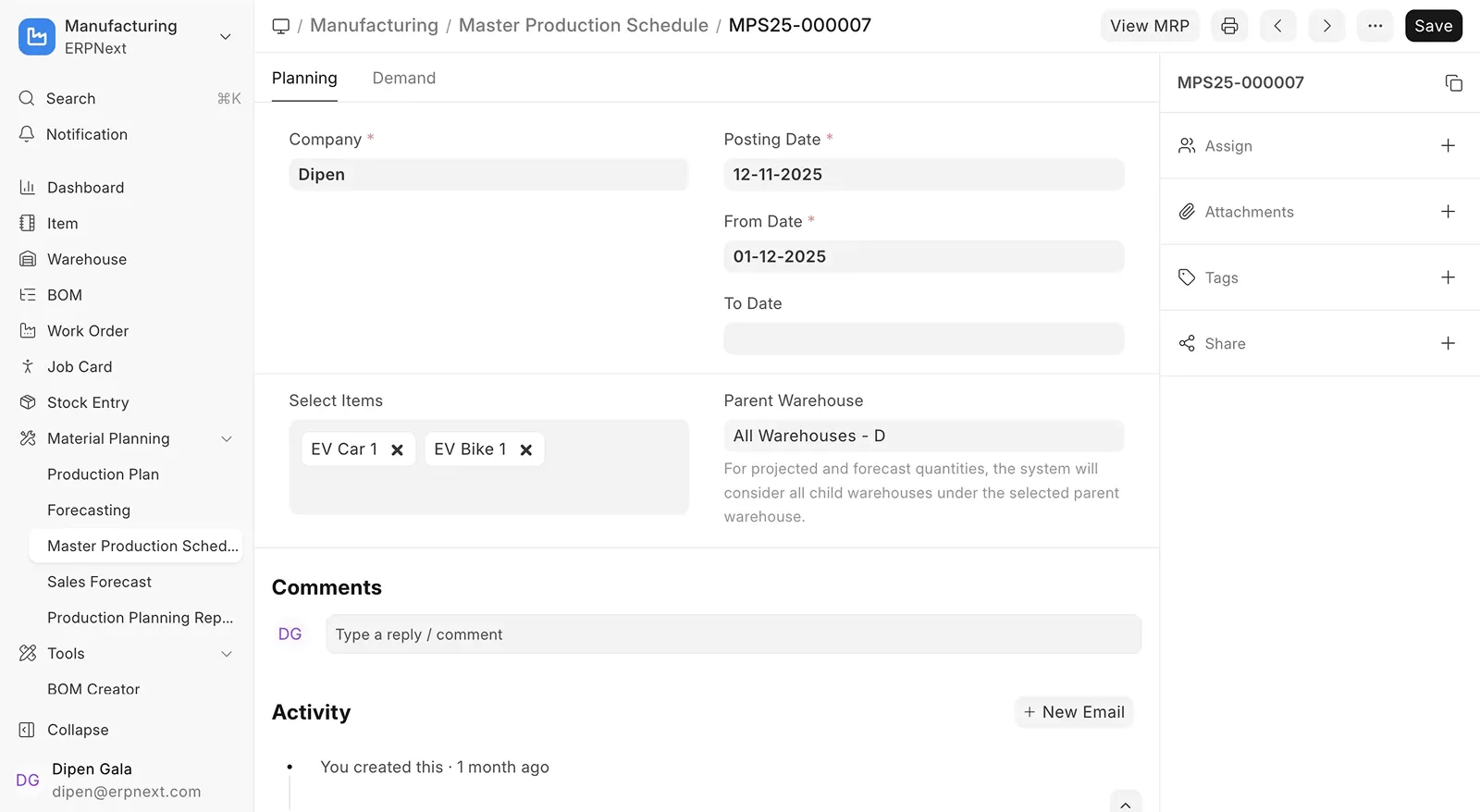
Master Production Schedule on Frappe's ERPNext v16 release page.
A v15 team can decide what to build from orders, projected quantities and a Production Plan. A v16 team can also represent forecast demand and order-release timing before turning the plan into supply.
By v16.33, manufacturing also includes:
- BOM secondary items distinguish co-products, by-products, scrap and additional finished goods.
- Cost allocation across the main output and secondary outputs must reconcile to 100 percent.
- Semi-finished goods can be tracked between operations, with Job Cards posting their own manufacture entries.
- Phantom BOMs can explode into the parent plan without becoming a stocked intermediate item.
- Work Orders can reserve stock and carry links back to the Master Production Schedule.
- Job Cards gain a more explicit start, pause, resume and complete cycle.
These changes are especially relevant to process manufacturing and multi-stage production. They also alter costing and transaction behavior, so the right comparison uses one representative product in both versions. Our ERPNext v16 manufacturing guide covers that version-specific workflow, while the broader guide to choosing ERP for manufacturing in India keeps the product-selection question separate.
Inward subcontracting gives job work its own records
ERPNext v15 supports outward subcontracting: your company supplies material to a subcontractor and receives the processed item back. Version 16 adds the inward direction for companies that manufacture with material supplied by a customer.
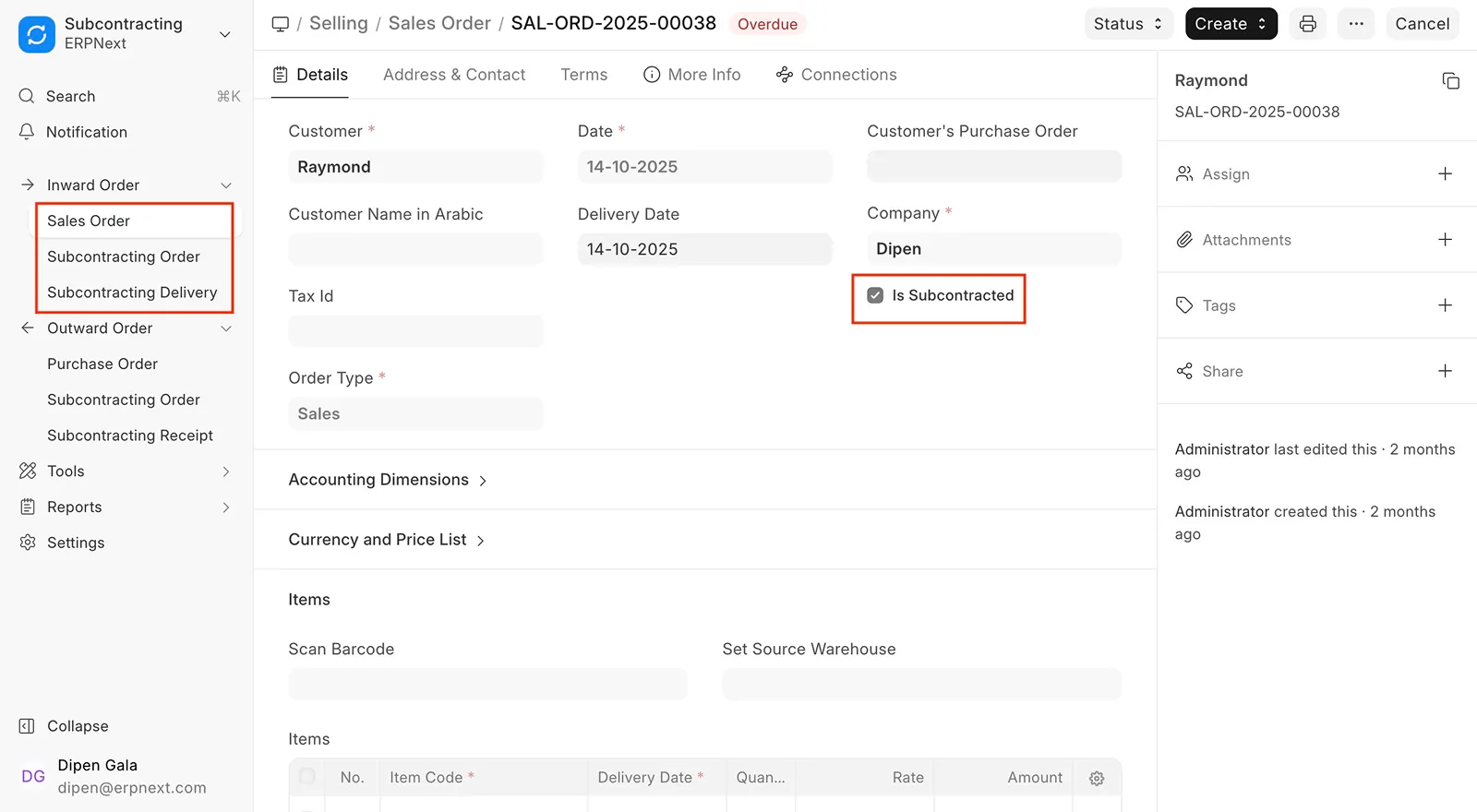
Inward subcontracting on Frappe's ERPNext v16 release page.
The flow begins with a subcontracted Sales Order and creates a Subcontracting Inward Order. Customer-owned material can move through a customer-linked warehouse, Work Order, production, delivery and return. The records track what was received, produced, delivered, returned and lost in process.
Job work was possible to model before v16, but it relied on less direct combinations of stock, manufacturing and sales records. The new inward workflow makes material ownership and the customer-facing production obligation explicit. Our inward subcontracting guide traces the full Sales Order, customer-material, production, delivery and return path.
Stock reservation and traceability reach more workflows
Stock reservation in v15 is centred on Sales Orders. Version 16 generalizes it across Work Orders, Production Plans and both directions of subcontracting. Reservation records can track transferred and consumed quantities, while Stock Settings can enable automatic reservation.
Version 16 also adds a Serial No and Batch Traceability report that can follow an item backward to its inputs or forward to the transactions and outputs that consumed it.
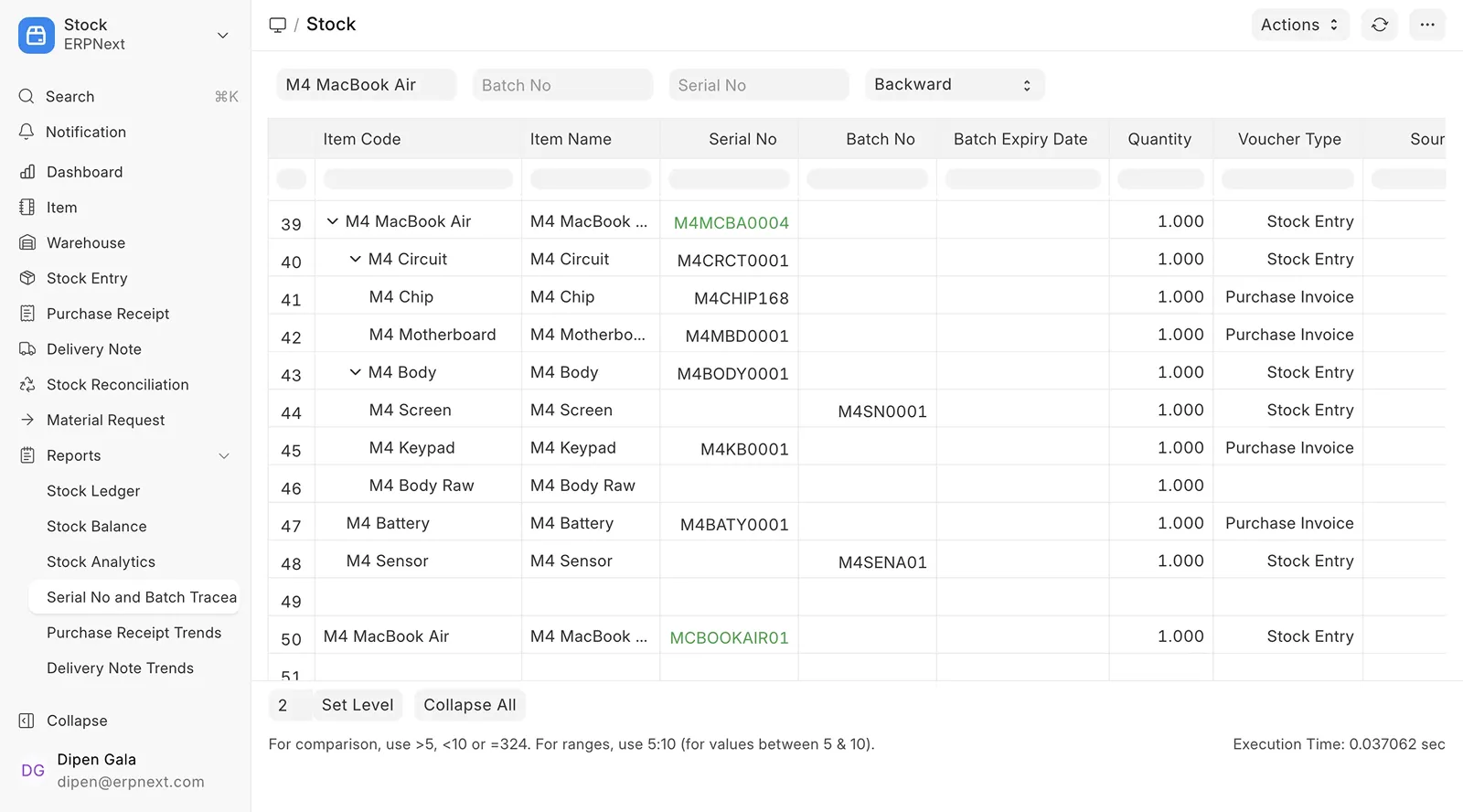
Serial and batch traceability on Frappe's ERPNext v16 release page.
A production planner can reserve material for work that has not reached delivery, while a quality or service team can trace a serialized or batched component through its transaction chain. The stock reservation and traceability guide covers the new reservation sources, quantity states and migration checks.
Sites with custom stock queries need more care. Serial and batch entries carry more transaction data directly in v16, and valuation and reposting paths changed. Reconcile stock value, general-ledger value, representative returns and backdated entries before approving a production upgrade.
POS remains in ERPNext v16
POS was not removed from ERPNext v16 and it was not split into a separate application.
ERPNext v16.33 lets a business choose whether the POS creates Sales Invoices or POS Invoices. New setups can use Sales Invoice, while POS Invoice remains available and is still Frappe's recommendation for high-volume retail.
An upgraded v15 site does not switch automatically. It keeps POS Invoice unless an administrator deliberately changes the setting after all registers have closed.
For integrations, the change reaches beyond the label. A connector that listens for POS Invoice, reads its consolidation behavior or assumes one closing path can miss a checkout recorded as Sales Invoice. Reports, loyalty logic, returns, stock updates and third-party POS applications should be tested against the selected invoice type.
The interface also gains a list view alongside the image grid, a revised order summary and updated opening-entry warnings. Our ERPNext v16 POS comparison explains how the two modes change posting, closing, returns, cashier work and reporting. A retailer should run its normal opening-to-close cycle in staging before changing the invoice mode.
Banking becomes a separate application surface inside ERPNext
ERPNext v16.33 includes a dedicated Banking application for statement import, transaction matching and reconciliation. It uses the same ERPNext bank accounts, payments, journal entries and ledger underneath.
The application brings bank accounts, statement import, transaction matching, reconciliation and rules into one interface. Its importer handles mapped CSV files, MT940 statements and PDF tables, including encrypted PDFs when a statement password is configured. Matching rules can classify transactions from description and amount conditions.
We are labelling Banking as a current v16.33 feature rather than claiming every part shipped in v16.0.0. Our ERPNext v16 Banking guide covers the source-traced import and reconciliation paths, while the ERPNext keynote article covers Frappe's later demonstration.
CRM and Support are still present, with a v17 warning
ERPNext v16.33.0 still contains the CRM and Support modules. Both workspaces carry banners saying they are scheduled for removal in version 17 and direct users to Frappe CRM and Frappe Helpdesk.
The current ERPNext 17 preview still contains both modules. Their navigation was rebuilt in August 2026 and the v16 removal banners are absent. Frappe staff have described Support removal as dependent on Helpdesk reaching parity, while Frappe's CRM article says the ERPNext module is maintained but receives no new features.
The ERPNext CRM versus Frappe CRM guide compares the sales workflows, integration boundary and migration options. The ERPNext Support versus Frappe Helpdesk guide does the same for tickets, SLAs, warranty and maintenance. Both transitions should follow missing workflow and data checks rather than the earlier banner date.
Custom applications need a real migration review
Some of the highest-risk changes are invisible during a product tour. Frappe and ERPNext v16 change APIs, data shapes, permissions, document hooks, runtime requirements and standard workspaces.
The official migration guides call out examples such as:
- item-wise tax detail moving into a child table;
- customized standard workspaces being replaced during migration;
- changed permission behavior and field access;
- changed data structures for tax withholding and other accounting records.
An installed application can migrate successfully and still produce a different business result. Stock valuation, tax calculation, reservation, pricing and reporting need transaction-level checks before production cutover.
Should you upgrade from ERPNext v15 to v16?
Version 16 is the stronger starting point for a new ERPNext implementation. It is the current supported major version, carries the longer planned support window, and contains meaningful improvements for finance, manufacturing, stock and subcontracting.
An existing v15 site should upgrade when the team can answer four questions:
- Do all installed applications support the target Framework and ERPNext point releases?
- Have the critical workflows passed in a restored staging copy with realistic records?
- Do accounting, stock, tax and operational reports reconcile before and after migration?
- Has the team tested backup restoration and agreed on a rollback decision point?
Staying on v15 for a controlled period is reasonable when a custom application is not ready, a statutory workflow has not been validated or the business cannot schedule a proper cutover. Frappe's published plan keeps v15 supported through the end of 2027 and v16 through the end of 2029. Those dates are planned, so check the current support page when making the decision.
ERPNext v16 FAQ
What is the latest stable version of ERPNext?
ERPNext v16 is the latest supported major version as of 31 August 2026. It continues to receive point releases, so record the exact ERPNext and Frappe Framework versions used during an upgrade rehearsal.
When was ERPNext v16 released?
ERPNext v16, Frappe Framework v16 and Frappe HR v16 were released on 12 January 2026. The final release followed a beta on 15 November 2025 and a delay from the original December target.
Is ERPNext v15 still supported?
Yes. Frappe's current plan supports ERPNext and Frappe Framework v15 through the end of 2027. Version 16 is planned through the end of 2029.
Was POS removed in ERPNext v16?
No. POS remains inside ERPNext and supports Sales Invoice and POS Invoice modes. Upgraded v15 sites keep POS Invoice unless an administrator chooses to change the workflow.
Were CRM and Support removed in ERPNext v16?
No. Both modules remain in ERPNext v16.33. Their workspaces carry planned v17 removal notices, but both modules also remain in the current v17 preview and its rebuilt navigation no longer shows those banners.
What is the biggest difference between ERPNext v15 and v16?
The new Desktop and navigation are the first visible difference. The larger operational gains depend on the company: configurable financial reports for finance, forecast-to-MRP planning for manufacturing, inward subcontracting for job work, and broader stock reservation and traceability.
Is ERPNext v16 safe to upgrade to?
Version 16 is a supported production release. Upgrade safety still depends on the site's applications, customizations, data, integrations and operating controls. Use a restored staging copy, reconcile business results and test rollback before migrating production.
Version 16 gives ERPNext a broader operational model and a more deliberate interface. The right next step for an existing v15 company is a representative staging run: one month end, one production cycle, one stock correction, one POS close and every critical integration. That evidence can support an upgrade decision better than a feature count.